
Incoming payments: match them to open invoices automatically
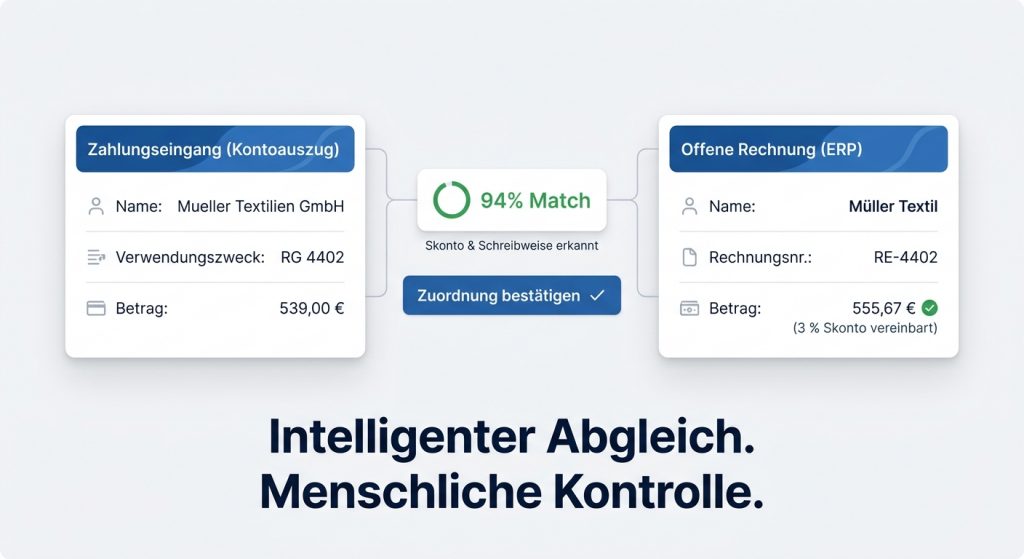
Every morning the same process starts in many companies: the latest bank statement is matched against open items. Some payments contain an invoice number, others only a company name or an incomplete payment reference. On top come cash discount, partial payments or different spellings between the bank and the ERP.
For an experienced clerk that is routine. For software this matching is often surprisingly hard. This is where an intelligent application can help. It finds links between incoming payments and open invoices and suggests matching assignments. A person still decides at the end, but a large part of the manual search drops away.
Why matching incoming payments costs so much time
An incoming payment is rarely as unambiguous as you would like. Typical cases in accounts receivable are:
- company names that differ between bank and ERP
- missing or incomplete invoice numbers
- cash discount deductions
- partial payments
- collective transfers for several invoices
- payment references without usable information
A clerk combines this information automatically. They see that the originator on the bank statement belongs to the debtor in the ERP despite a different spelling, or that the amount is lower because of an agreed cash discount.
Those same links can be recognised in software. Instead of checking every booking fully by hand, matching invoices are suggested and only unclear cases are put forward for a decision.
Example of a possible workflow
The view below shows a possible flow for matching incoming payments.
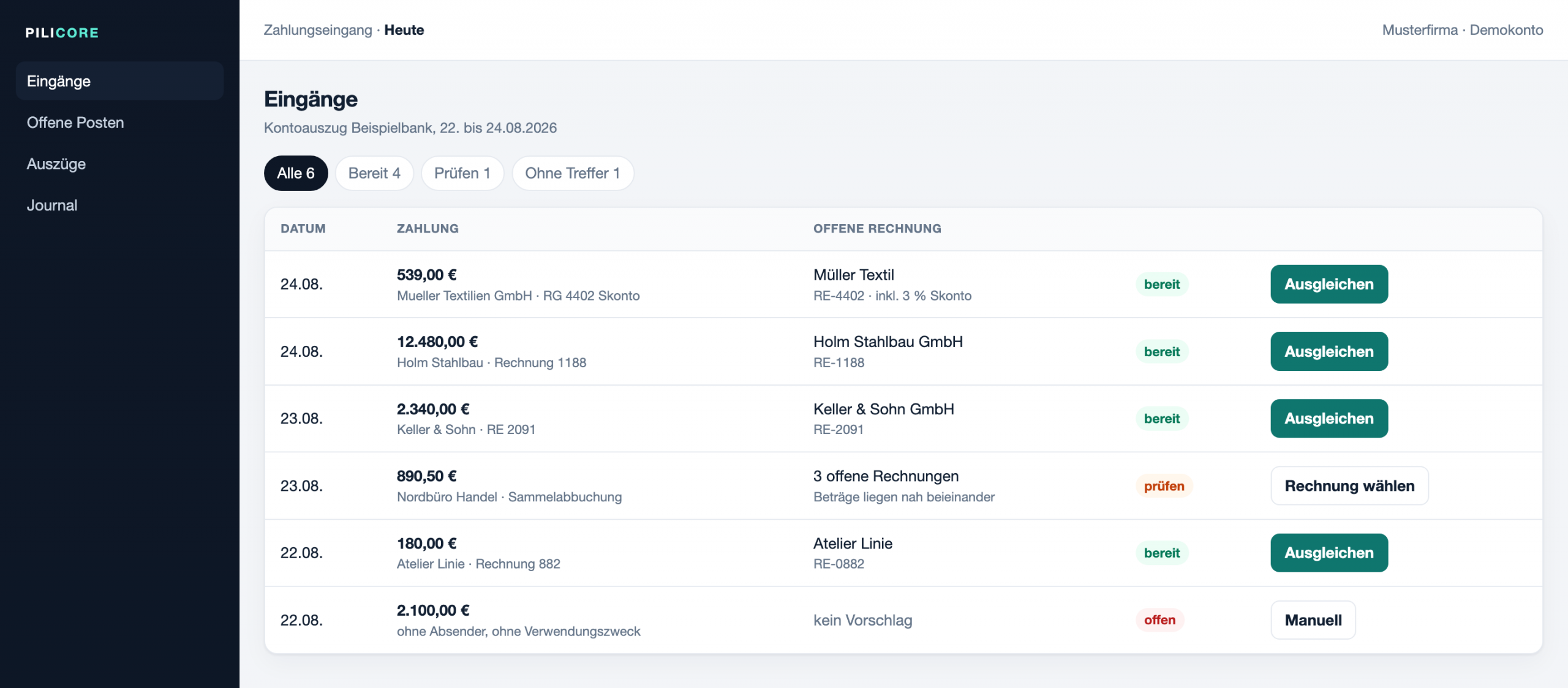
For each incoming payment the system checks automatically whether a matching open item exists. Several criteria can be used at the same time:
- name of the payer
- invoice number in the payment reference
- payment amount
- agreed cash discount rules
- open invoices of the debtor
If the match is clear, the incoming payment can be cleared directly. If several options remain, the case is flagged for manual review.
Recognising variant company names and cash discount automatically
A typical real case shows why a purely technical invoice match often is not enough.
On the bank statement the originator appears as the bank delivers it:
- Mueller Textilien GmbH
- RG 4402
- 539,00 €
In the ERP the debtor is stored differently:
- Müller Textil
- Invoice RE-4402
- 555,67 €
- 3 % cash discount agreed
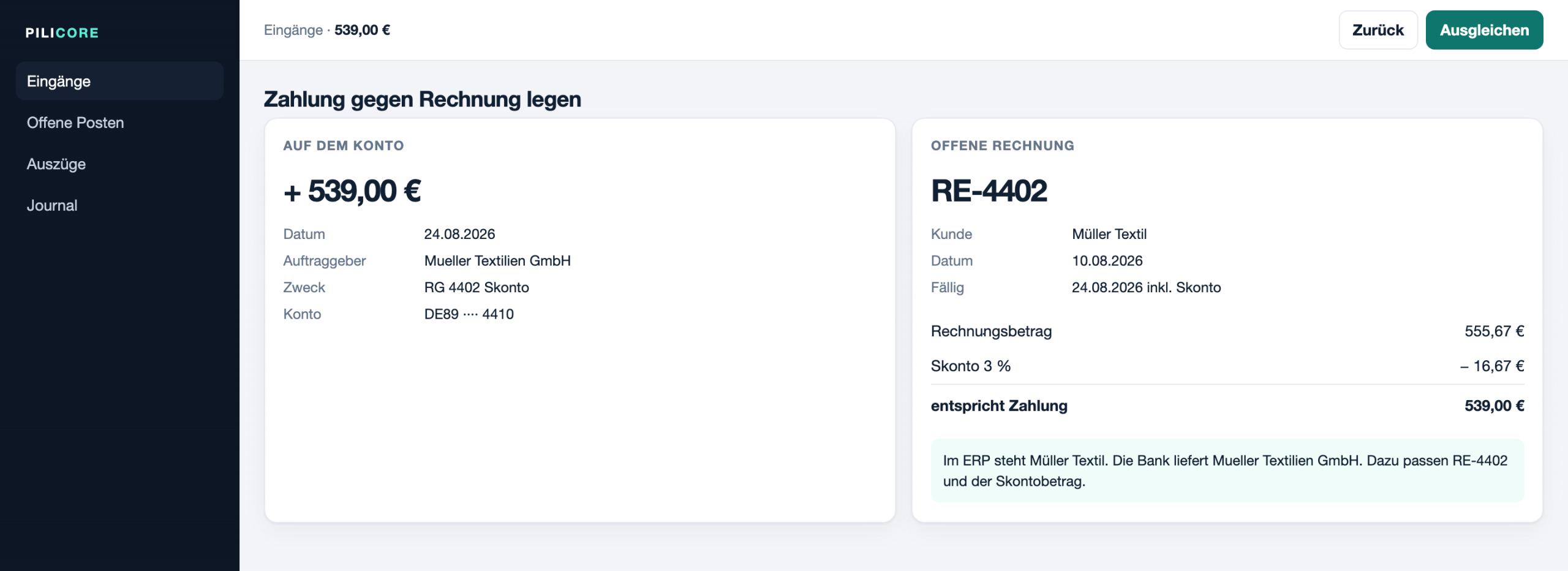
For someone in accounting the match is obvious. The invoice number fits, the company name on the statement and in the ERP refer to the same customer, and the payment amount equals the invoice amount minus the agreed cash discount.
An intelligent application can combine the same information and produce a clear suggestion. In many cases the manual search then drops away. That is custom process automation for finance processes: bring rules and data sources together, leave unclear cases to a person.
Handle ambiguous incoming payments safely
Not every incoming payment can be matched uniquely. Collective transfers or several open invoices with similar amounts often leave more than one option.
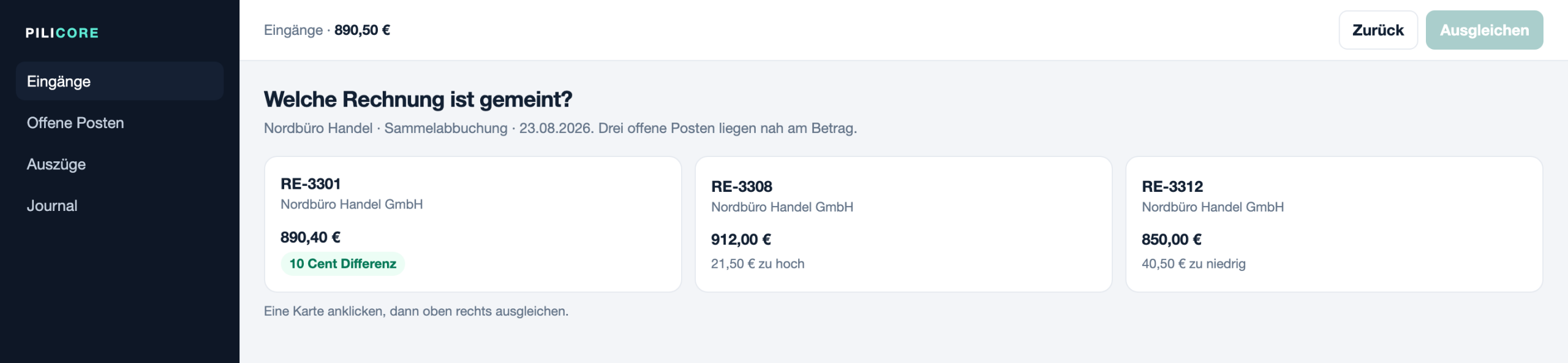
In those situations software should not post automatically. Instead the most likely hits are shown and the clerk decides in a few clicks which invoice should actually be cleared.
This mix of automation and human control cuts manual effort a lot, without weakening accounting controls.
For a technical view of how invoice numbers, amounts, IBANs, names and a confidence score can be combined, see Program invoice matching: automatically match bank transactions to open invoices.
From the idea to the integration
The application shown is an interactive prototype. It illustrates the later working flow and shows how incoming payments can be matched to open invoices automatically. The technical connection to SAP, DATEV or other ERP systems comes in the next step of a project.
To assess the workflow you do not need a live connection to SAP, DATEV or another ERP first. What matters is whether the application recognises incoming payments reliably, finds matching open invoices and makes day-to-day work in accounts receivable easier.
Only in the next step comes the technical integration. That includes, for example, importing bank statements, access to open items and handing confirmed postings to the ERP in use.
For the technical options for retrieving bank transactions and the roles of PSD2, FinTS and EBICS, see Retrieve bank transactions via API: PSD2, FinTS or EBICS?.
Conclusion
Matching incoming payments to open invoices automatically saves time, reduces manual search and supports accounts receivable in daily routine work. The value of intelligent support shows especially with variant company names, cash discount, partial payments or unclear payment references.
The real challenge is not building an interface. What counts is a workflow that supports accounting staff reliably and only steps in where automation actually makes sense.
Do you know this problem in accounts receivable and want to cut recurring manual matching? In 15 minutes I clarify without obligation how such a workflow can connect to the systems you already run. Book a first conversation.
Collaboration
Custom AI and automation solutions, fitted to process, data risk and cost.
Get in touch →Blog
New articles by email. No ads.